


One of the first topics in any major network exam is architecture, and that’s not a coincidence. This is everywhere, and it’s more important than you probably realise when you’re going through the CCNA (or any other entry-level study).
There are two major campus architectures.
Now, when I say “campus,” that usually refers to multiple buildings in a single location (apparently between 1-5kms apart), however these architectures are very much used in single building networks, and even datacenters. They are not limited to just being used in “campus” settings
Regardless of the size, the goal is the same: building a network that is resilient, scalable, and easy to troubleshoot. Let’s break down the two main approaches.
The Three-Tier Design
Typically used in larger networks with multiple communication closets across a site, this is the classic hierarchical model.
The Core Layer: This is the backbone. The Core supposed to be about speed. It shouldn’t be worrying about individual user VLANs or NAC policies. Its only job is moving packets between the Aggregation blocks as fast as possible. You may see ECMP (Equal Cost Multi Path) and point-to-point routed links here. Layer 3 protocols like OSPF converge much faster than waiting for a STP to propagate through a complex Layer 2 environment.
The Aggregation Layer (sometimes called Distribution): Usually, the Layer 3 boundary lives here. VLANs typically do not stretch beyond the aggregation layer. That said, this is a design choice; “stretching” Layer 2 across the core is a common (even if often debated) choice among engineers.
The Access Layer: Where the “things” plug in. At this scale, access switches are almost always stacked to provide high density and simplified management.
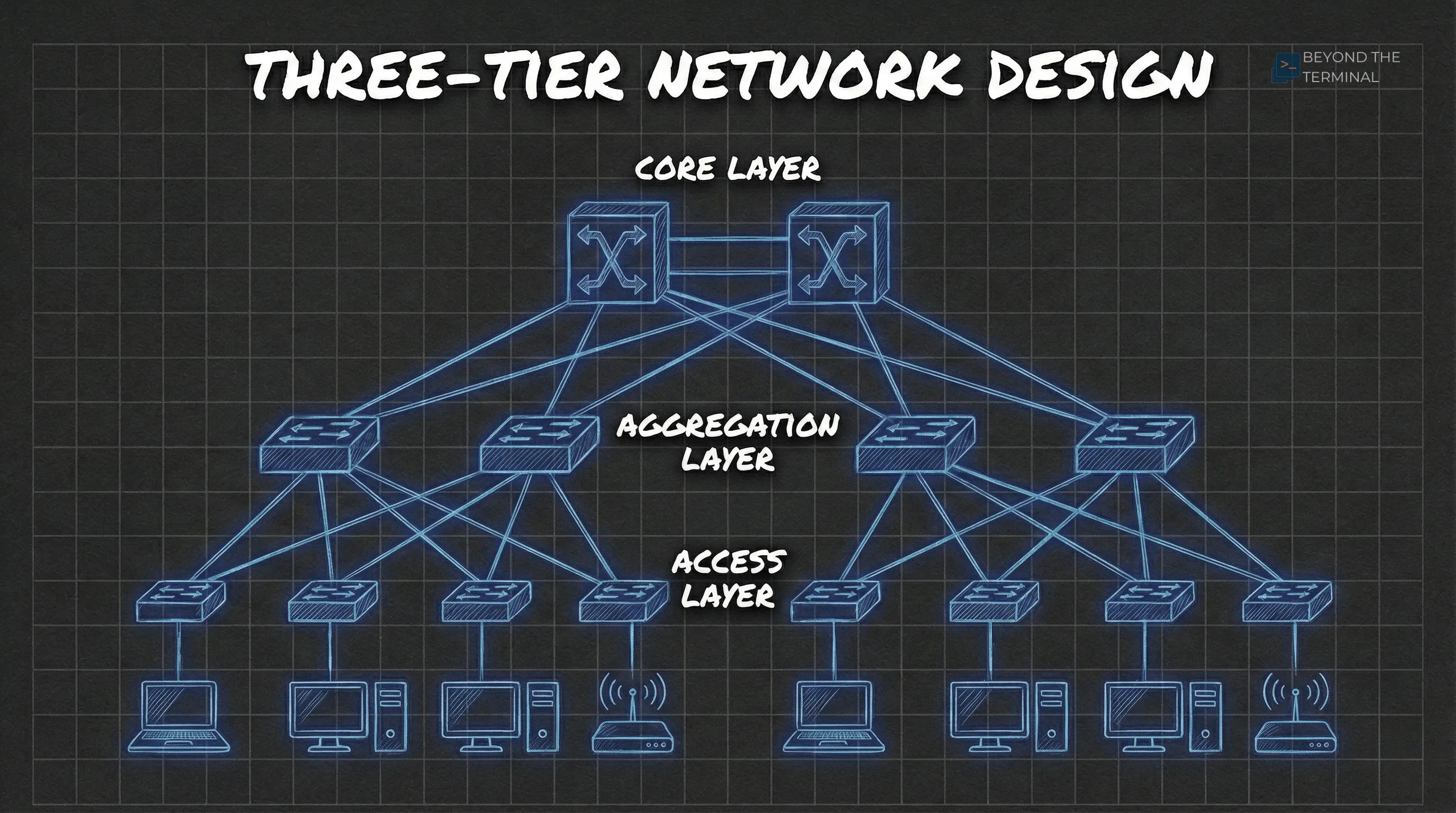
Bringing this into the 2020s - Routed Access A more modern approach is known as Routed Access or Layer 3 Edge, where you push the Layer 3 boundary all the way down to these access switches. By running a routing protocol to the access layer, you pretty much remove Spanning Tree issues entirely. The trade-off is a much larger routing table to manage and potential problems with legacy devices that rely on Layer 2 adjacency and broadcasting.
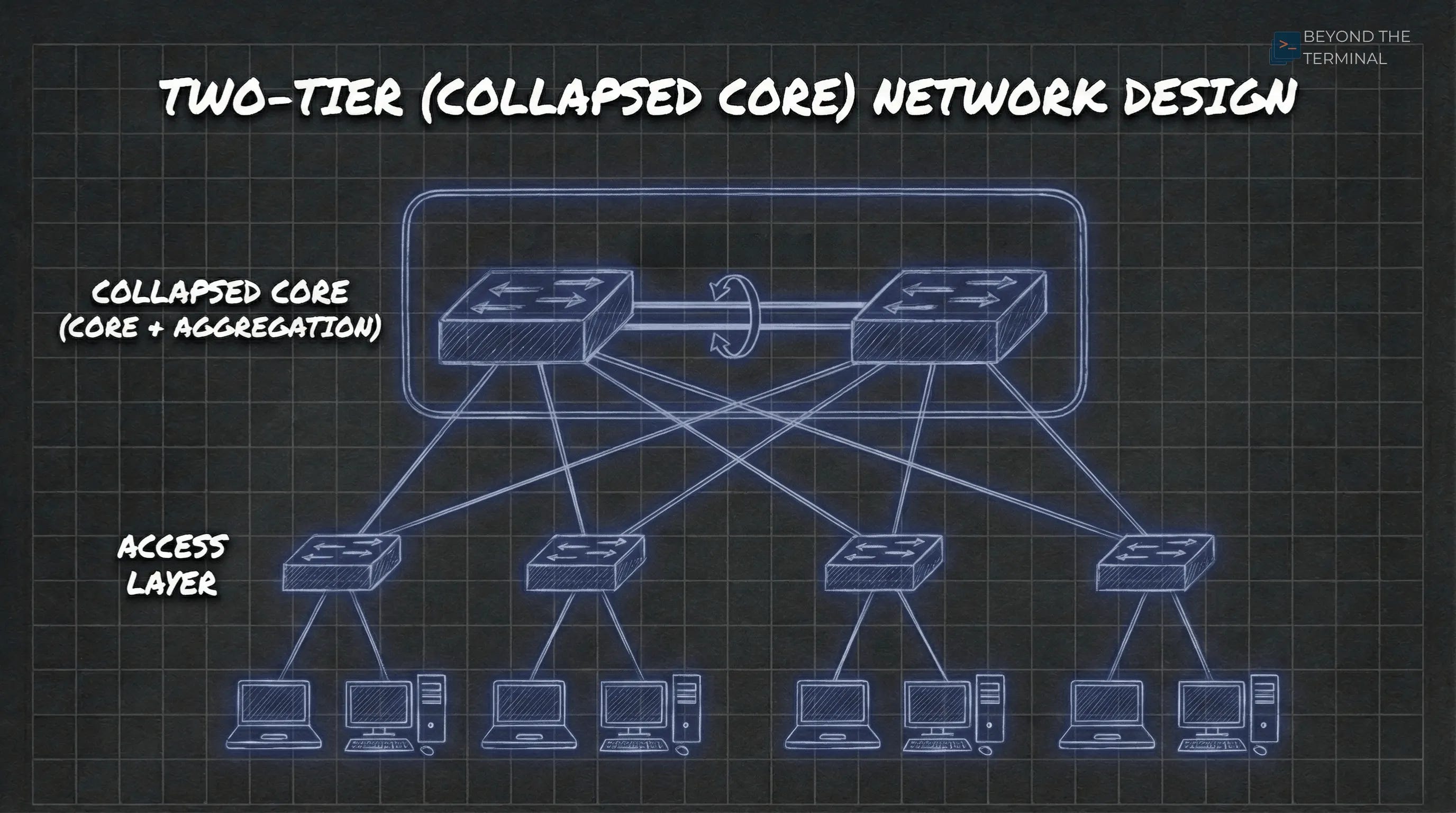
The Two-Tier (Collapsed Core) Design
If you’re working in a smaller office or a site with just a handful of racks, the Two-Tier design is simple, effective, and keeps the management overhead down.
The Collapsed Core Layer: We call it “collapsed” because this layer is doing the job of both the core and aggregation layers. It handles the high-speed switching whilst also acting as the default gateway for every VLAN in the building. It’s the center of the network, doing the heavy lifting. Traditionally, here is where you put your Layer 3 gateways and do some security.
Redundancy & Reliability: You’ll typically see the core switches paired up using MC-LAG (Multi-Chassis Link Aggregation**)**. This ensures that if one switch dies, the other takes over instantly. While we used to use VRRP for this, modern MC-LAG setups usually provide an “Active-Active” gateway that is even more efficient.
The Access Layer: Similar to the three-tier model, the access layer is where your users and APs live. However, in this model, the access switches are almost always Layer 2. They just pass traffic up to the Core/Agg Layers.
Routing Logic: Core vs. Router on a Stick
Where you actually terminate your layer 3 gateways is an architectural choice that changes based on your security needs.
Layer 3 in the Core/Agg: This is the high-performance choice. The switch handles routing in hardware (ASICs), which is very quick. The trade-off is that switches are “open by default,” so you’re relying on Access control lists (ACLs) if you want to stop VLANs from talking to each other. There are very minimal security options here. If you’re looking for anything more than block or allow, you really need to add a firewall.
Quick Note on this: there are other methods we can use to secure traffic in this architecture, but delving into that is a can of worms I don’t want to open in this post.
Router/Firewall on a Stick (ROAS): If you need to secure or inspect inter-vlan traffic, you send it to a firewall. I’ve seen this at small sites where a single edge firewall handles all the routing and security. It’s easy to manage, but the firewall can become a performance bottleneck for internal traffic if you don’t size the hardware correctly.
In larger environments, one option is to route on the switch and only send sensitive traffic to a firewall cluster, or have multiple firewalls protecting key segments. Again, there are many ways to achieve security in these architectures, but I think this post is long enough.
Tunnels and Overlays: The Modern Architectures
Modern user requirements like seamless roaming and micro segmentation are leading us toward using overlays. This is where we wrap our traffic inside another protocol (a tunnel) to move it across the physical network (the underlay). You may have heard these terms when talking about SD-WAN, which uses a similar concept.
Note: It may not be obvious, but for the underlay, you could still use either a 3-Tier or a collapsed core architecture. Then the tunnels run over the top.
User-Based Tunnelling (Aruba) or SD-Access (Cisco) : Traditionally, Wireless Access points used this concept to tunnel traffic to a gateway so that we could do some level of security on our wireless networks. UBT take the same approach, but on the wired ports. This takes traffic from a switch port and tunnels it directly to a central Gateway or Firewall using GRE. SD-Access uses VXLAN to achieve the same segmentation. It means a user gets the same security policy whether they are on floor 1 or floor 10 because their “gateway” is always the same.
Note on this: Because GRE adds extra headers, you must enable Jumbo Frames (Typically set at 9000 bytes) on your physical path. If you don’t, you’ll be troubleshooting weird fragmentation issues that’ll make you want to throw your laptop out of the window.
2. EVPN-VXLAN: This is probably the most common form of overlays in recent years. It’s slightly more complex but incredibly scalable. It creates a distributed fabric where the switches themselves handle the “mapping” of where users are. It’s becoming the standard for large-scale, modern campus designs because it removes the need for Spanning Tree across the fabric while still allowing you to have Layer 2 connectivity wherever you need it. I’m not going into it in this post, but it’s a cool piece of tech that makes stretching VLANs very much achievable.
Which to choose when?
Honestly, it’s all about size, budget and ultimately business requirements. I mostly see collapsed core in my market. But I’m seeing more and more customers looking to use the modern VXLAN architectures.
If this has helped you, let me know in the comments.
Cheers
Danny
Well laid out! Agreed, there is a lot more of collapsed cores out there but also depends on matter too. I have had the honor of working in healthcare, government, finance and each are setup in different manners. All of which were large enterprises. But all have shifted more to CC except for financial due to the size and geographic locations. Additionally, more redundancy which is key to that market.